Operating System (OS)
An operating system (OS) is system software that manages computer hardware and software resources and provides common services for computer programs. The OS is responsible for making it easy to run programs (even allowing you to run many at the same time seemingly), allowing programs to share memory, enabling programs to interact with devices, and other fun stuff. The OS ensures that the system operates correctly and efficiently in an easy-to-use manner.
The OS can be divided into three logical topics [OSTEP]:
- Virtualization
- Concurrency
- Persistence
According to [LKD], the OS is the part of the system responsible for basic use and administration. The OS includes the kernel and device drivers, boot loader, command shell or other user interface, and basic file and system utilities. It is the stuff you need - not a web browser or music player.
Kernel
The kernel is the core component of an operating system. The kernel has complete control over every resource of a system. The kernel portion of the operating system code is always resident in memory and facilitates interactions between hardware and software components.
Typical components of a kernel are:
- Exception traps, such as interrupt handlers to service interrupt requests
- A scheduler to share processor time among multiple processes
- A memory management system to manage process address spaces
- System services such as networking and interprocess communication
Kernels can be classified as monolithic or microkernels. A monolithic kernel consists of a single, large executable, where the entire system runs in kernel mode. Monolithic kernels offer high performance due to the absence of inter-process communication overhead, allowing for quicker system execution. Microkernels only have core functionalities in kernel mode, and the rest of the services run on user-mode processes. Both architectures have advantages and drawbacks; for example, in monolithic kernels, a bug specific to a subsystem can crash the whole kernel. In the same scenario, the microkernel solves this by killing the erroneous subsystem. The Linux kernel is an example of a monolithic kernel, and QNX is a microkernel.
Microkernel vs Monolithic Kernel
Linux supports the dynamic loading of kernel modules. Although the Linux kernel is monolithic, it can dynamically load and unload kernel code on demand.
In a microkernel architecture the kernel contains just enough code that allows for message passing between different running processes. One of the advantages of this architecture is that the services are isolated, so bugs in one service won’t impact other services. As such, if a service crashes we can restart it without affecting the whole system. This architecture imposes a modular approach to the kernel and offers memory protection between services but at a cost of performance. What is a simple function call between two services on a monolithic kernel now requires going through IPC and scheduling which will incur a performance penalty.
Modern monolithic kernels use several approaches to be modular (like microkernels):
- Components can be enabled or disabled at compile time
- Support of loadable kernel modules at runtime
- Organize the kernel in logical, independent subsystems
- Strict interface but with low-performance overhead: macros, inline functions, function pointers
Process
A process is an abstraction of a running program. A process is the program code loaded into the main memory so the CPU can execute it. The program itself is lifeless: it just sits there on disk, with many instructions (and maybe some static data) waiting to spring into action. The operating system takes these bytes and gets them running, transforming the program into something useful.
Each process accesses its own private virtual address space or address space for short, which the OS somehow maps onto the machine’s physical memory. Two running programs may use the “same” address, e.g., 0x20000, but they’re completely different spaces in the actual physical memory.
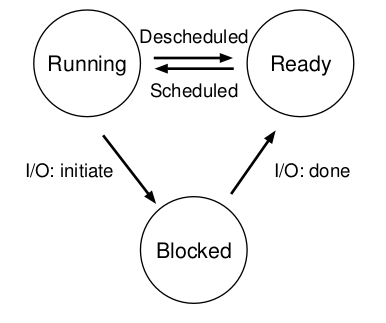
States of a Process
- Running - a process is running (executing instructions) on a processor
- Ready - a process is ready to run, but the OS has chosen not to run it for some reason
- Blocked - a process that has performed some operation that makes it not ready to run until another event occurs
Other states may include terminated, suspend ready, and suspend blocked.
The following figure shows the state transition that a given process can have.
Task Structure
Scheduling
The kernel does process scheduling to determine which process will execute. Scheduling handles the context switch between a running process from the CPU and selecting another (ready) process based on particular policies [TP-Sched].
Scheduling allows a system to be multiprogram (“multitask”), i.e., the system gives the user the illusion that more than one program is running simultaneously on a certain CPU.
Context Switch
In short, switching from one program to another is a context switch.
The OS tracks certain information about each process, such as memory-related info (start of process memory, size, bottom of kernel stack), task structure, process ID, and process state. A component of this information is a data structure that stores the contents of the registers for a specific process called the register context. When a process is stopped, its register state will be saved to this memory location; restoring these registers allows the OS to resume running the process.
A context switch is a mechanism where the register context of a certain (stopped) process is placed back into the actual physical registers of the processor so the OS can resume running the process.
Categories of Scheduling
There are two categories of scheduling:
* Preemptive: the scheduler can interrupt the running process at any time, schedule another process and
resume the original process later. The OS allocates the resources to a process for a fixed amount of time.

* Non-preemptive: the resources can't be taken from a process until the process completes execution.
Most modern systems are preemptive.
Scheduling Algorithms
* FIFO (First-In First-Out) or (FCFS - First Come First Serve)
* Shortest-Job-First (SFJ)
* Shortest Remaining Time
* Non-preemptive Priority
* Preemptive Priority
* Round Robin
* Multilevel Queue Scheduling
Multicore Scheduling
Concurrency
Concurrency Problems
Common concurrency bugs can be divided into deadlock and non-deadlock.
Deadlock Bugs
Non-Deadlock Bugs
Two types of non-deadlock bugs are atomicity violation bugs and order violation bugs.
The definition of an atomicity violation bug is “The desired serializability among multiple memory accesses is violated (i.e., a code region is intended to be atomic, but the atomicity is not enforced during execution).”
Thread 1:
1 if (thd->proc_info) {
2   ...
3   printf("%d\n", thd->proc_info);
4   ...
5 }
Thread 2:
1 thd->proc_info = NULL;
An atomicity violation bug occurs if Thread 1 is interrupted after it has checked if thd->proc_info is not NULL and before printing the value by Thread 2. The solution to this bug is to add locks around the shared-variable references, ensuring that it has a locked held when either thread accesses the proc_info field.
Order violation definition is “The desired order between two (groups of) memory accesses is flipped (i.e., A should always be executed before B, but the order is not enforeced during execution).”
Thread 1:
void init()
{
    ...
    mThread = PR_CreateThread(mMain, ...);
    ...
}
Thread 2:
void mMain(...)
{
    ...
    mState = mThread->State;
    ...
}
If Thread 2 runs before Thread 1, Thread 2 has a NULL pointer dereference because mThread hasn’t been created yet. The fix to this type of bug is to enforce ordering. Condition variables are an easy and robust way to add this style of synchronization.
Policy vs Mechanism
Policies are ways to choose which activities to perform.
Mechanisms are the implementations that enforce policies, and often depend to some extent on the hardware on which the operating system runs.
Example: A process may be granted resources using the first come, first serve policy. This policy may be implemented using a queue of requests as a mechanism.
CPU Virtualization
Virtualization of the CPU and memory. Turning a single CPU (or small set of them) into a seemingly infinite number of CPUs and thus allowing many programs to seemingly run at once is what we call virtualizing the CPU.
"Let us take the most basic of resources, the CPU. Assume there is one physical CPU in a system (though now there are
often two or four or more). What virtualization does is take that single CPU and make it look like many virtual CPUs to
the applications running on the system. Thus, while each applications thinks it has its own CPU to use, there is really
only one. And thus the OS has created a beautiful illusion: it has virtualized the CPU" [OSTEP]
On protected memory systems, the kernel has special “privileges” compared to user applications. This includes a protected memory space and full access to the hardware, called “kernel space”. User applications execute in “user-space”.
When an application executes a system call, we say that the kernel is executing on behalf of the application. Furthermore, the application is said to be executing a system call in kernel-space, and the kernel is running in process context.
Process Synchronization
Mutex/spinlock/semaphore
To provide synchronization, the kernel can disable interrupts.
Synchronization Primitives: http://www.cs.columbia.edu/~hgs/os/sync.html
Process vs Thread vs Task vs Job
A process is a program (object code) in the midst of execution and all data and resources related to the program running. In other words, a process is the living result of running program code. Processes provide two virtualizations: a virtualized processor and virtualized memory.
Process include a set of resources such as open files and pending signals, internal kernel data, processor state, a memory address with one or more memory mappings, one or more threads of execution, and a data section containing global variables.
Threads (of execution) are the objects of activity within the process. Each thread includes a unique program counter, process stack, and a set of processor registers.
Process (task) vs Threads - Linux Love p. 24 51/468.
System Calls, Interrupts, Signals
Applications running in user-space communicate with the kernel via system calls.
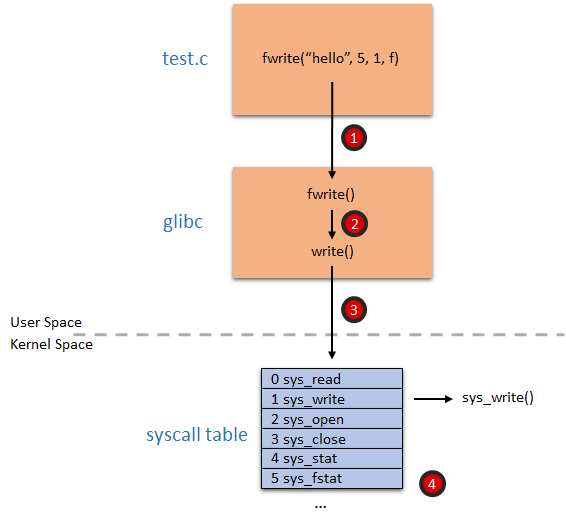
When hardware wants to communicate with the system, it issues an interrupt that literrally interrupts the processor, which in turn interrupts the kernel. A number identifies interrupts and the kernel uses this number to execute a specific interrupt handler to process and respond to the interrupt.
In many operating systems (including Linux), the interrupts don’t run in process context. They run in an special interrupt context, that is not associated with any process.
Memory Virtualization - Memory Management
virtual memory/paging/translation/segmentation and thrashing
Slab allocation
Slab allocation is a memory management mechanism intended to allocate objects efficiently. Compared with earlier mechanisms, it reduces fragmentation caused by allocations and deallocations.
Memory Allocation
- First fit
- Best fit
- Worst fit algorithms
Internal and External Fragmentation
Virtual Memory vs Physical Memory
Address translation.
Memory API
- malloc
- free
Segmentation
Paging
Non-contiguous allocation.
TLB
Page Replacement Techniques
- FIFO
- Optimal
- LRU
Cache
Learn: cache hit, cache miss, cache coherency/cache line, hot cache.
Thrashing Problem
Page swapping.
Concurrency
Concurrency is the ability to run multiple applications at the “same” time.
Threads (API)
Multithreading
Spinlocks vs Mutex vs Binary Semaphores vs Counting Semaphores
Locks
Reader-writer locks.
Semaphores
The dining philosophers’ problem.
Mutex
Monitors
Inter-Process Communication (IPC)
Concurrency Problems
- non-atomic
- race conditions
- blocking
- starvation
- deadlock and livelock (prevention and avoidance)
Learn the banker’s algorithm for resource allocation and deadlock avoidance.
Critical Sections Problems
Understand solutions to critical section problems with the help of mutex and semaphores.
Hardware solution: test and set lock solution and swap instructions.
Producer-Consumer Problem
Solution using semaphore and mutex.
Persistance
Understand persistence via devices and file systems.
I/O Devices
Memory-mapped IO / IO Mapped IO. Scheduling IO.
Hard Disk Drives
File Systems
-
IPC - Inter-Process Communications
-
Interrupts